 HeyBeauty
Send one booking link
Clients see your service, open time and the next step — no long chat required.
Put one booking link in your Instagram bio and clients book online, any time. Then get paid on the spot — they tap their card or phone right on yours. No terminal, no awkward "can you transfer me?"
Walk-ins, mobile, solo
A link for your Instagram bio
Your client books through your link, you confirm — and get paid in person or online.
Select the service and amount in the app — that's all the setup.
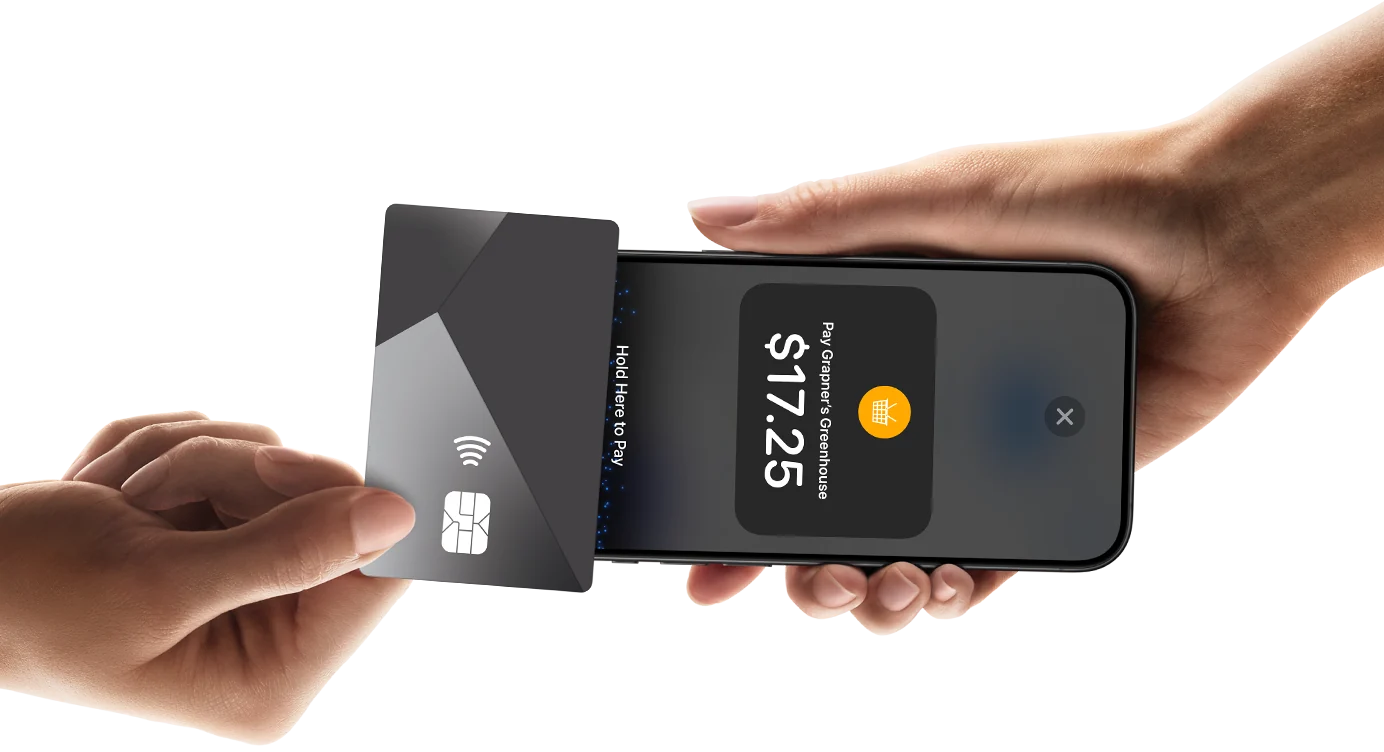
Set upIn person, they tap their card, phone or Apple Pay right on your iPhone. No terminal.
In personSend a link and your client pays by card, Apple Pay or Google Pay — from anywhere.
OnlineDrop one link in your bio and clients book you online — any time, without a single DM. Every booking lands straight in your calendar.
Add your link to your Instagram bio, Stories or DMs — one tap and clients are booking.
Clients pick a service and an open slot themselves, 24/7 — no back-and-forth chat.
Clients can pay online when they book — or pay you at the visit.
Take every in-person, contactless payment — debit and credit cards, Apple Pay and other digital wallets — with nothing but your iPhone. No extra hardware.
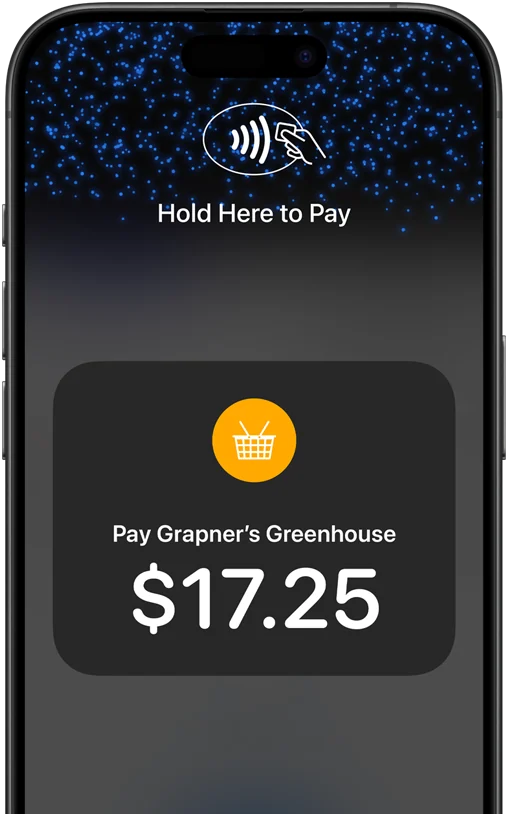
No card readers or terminals to buy or manage — just iPhone and the HeyBeauty app.
Accept contactless debit and credit cards, Apple Pay and other digital wallets in one tap.
Apple doesn't store card numbers on iPhone or on Apple servers — your data stays yours.
No heavy CRM to learn. Just the tools that turn interest into paid work.
Service, available time and payment in a single clean flow your clients can finish in seconds.
Clients can pay when they book — or send a link to get paid after the visit.
Accept contactless card and phone payments in person. No terminal, no extra hardware.
Slots, client reminders and paid status live together, so nobody forgets and nothing slips.
Independent pros, mobile workers, creators, consultants and small teams. One link turns interest from Instagram, chat or your site into a paid booking.
Clients see your service, open time and the next step — no long chat required.
Clients pay online when they book, and the slot is theirs — every booking lands in your calendar.
Card, phone or payment link — no separate terminal for the simple in-person flow.
Free onboarding: we build your profile, services, booking link and first payment flow so you can take real bookings the same day.
Claim free setup 15–30 minute setup · Limited onboarding slots each week.Send a colleague the link to your page. They sign up through it and start taking payments — and every online payment they take brings you a share of our fee. For as long as they work.
It's the link to your page you already share — with an invite tag on it. Copy it in the app and send it in a DM.
Every online payment your colleague takes — card or Tap to Pay — adds a reward to your account. Cash doesn't count, and there's no minimum to cash out.
You keep earning from their online payments for as long as they work with HeyBeauty.
Your share comes out of our fee — your colleague pays nothing extra.
I take card payments right on my phone. Clients tap and we're done — no terminal on the table.
One link in my bio and people book and pay while I'm still with the previous client.
Sample quotes shown for layout — swap in real client feedback before paid traffic.
It's free to download and free to run your pilot. When you take payments, card processing is handled at a simple per-transaction rate — no monthly fee to start and no terminal to buy. (Confirm your exact rate during setup.)
Create your free HeyBeauty booking page, copy your link — like hey-beauty.app/@yourname — and paste it into the website field in your Instagram bio. Clients tap it to see your services, pick an open slot and book, any time. They can pay online right away or pay you at the visit.
No. Your booking link opens in any browser — clients pick a service and time and book in seconds, with no download and no account. You get the booking and reminders in the HeyBeauty app.
Payments are processed and paid out to your connected account on a regular payout schedule. Online and in-person payments both land in the same place.
Every online payment the pro you invited takes — card or Tap to Pay — pays you a share of our fee, automatically, for as long as they keep working. There's no minimum to cash out: rewards land in the same account your own payments are paid out to. We confirm your rate when we set you up.
The same free start as anyone signing up today: free app, free setup with us and the regular payment rate — your invite costs them nothing extra. Your reward comes out of our fee, not out of their money.
Contactless card payments work on supported iPhone and Android devices — no extra reader required. If your device isn't supported, you can still take payments by card and payment link.
Yes. Payments run on PCI-compliant infrastructure — the same payment rails used by major businesses. Card details never sit on your phone.
Absolutely. Start with a booking link and share it from Instagram, chat, ads or a QR code. No website needed.
Yes. When clients book through your link, they can pay the full price online right away — or choose to pay at the visit.
Yes. HeyBeauty supports service professionals and small businesses across the United States and Europe — online booking and card payments on supported devices.
Usually 15–30 minutes: profile, services, schedule, booking link and your first payment method. We'll do it with you in the early launch offer.
Leave your number and we'll set up your profile, services, booking link and payment flow — so you can take real bookings the same day.